HTML5 Slot Performance Optimization
HTML5 slot performance optimization is the process of identifying and reducing technical bottlenecks in a browser-based game interface. A client that consumes excessive memory, freezes during an animation or fails to display an account update reliably can confuse users. The objective is clear, stable and accessible presentation, particularly on mobile devices with limited resources. Faster rendering must not be confused with faster gambling: game rules, financial records and mandatory timing restrictions remain independent of graphical performance.
This guide concentrates on diagnosing the client rather than designing game mathematics or building a complete product. For component boundaries, see the HTML5 game engine architecture guide. The historical handheld game porting guide provides additional context about resource constraints without implying that Barking Lizards developed regulated gambling products.
What to Measure Before Tuning
Begin with a reproducible baseline. Use an authorized test environment with simulated funds and predetermined test scenarios. Record the build identifier, browser version, device model, viewport, device pixel ratio, network conditions and cache state. A trace from a powerful desktop computer cannot establish that the same interface is reliable on an inexpensive phone.
Define separate scenarios for first launch, opening the rules, displaying a recorded result, changing orientation and returning from a backgrounded tab. Repeat each scenario under the same conditions before and after a change. Keep the measurement interval consistent and report the number of observations. A single successful run can conceal intermittent stalls.
Frame Time, Loading and Memory
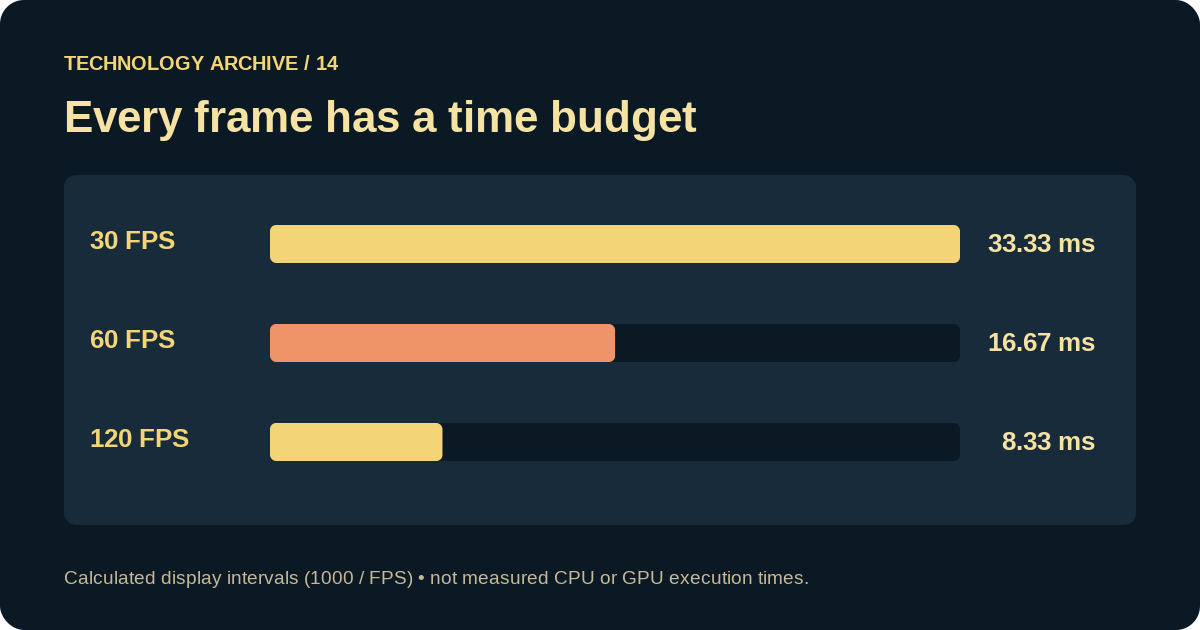
Frame rate is an aggregate measure; frame intervals reveal uneven motion that an average can hide. At a nominal 60 Hz, the display interval is about 16.67 milliseconds. At 30 Hz it is about 33.33 milliseconds, and at 120 Hz it is 8.33 milliseconds. These are calculated intervals, not guaranteed CPU budgets. Browser composition and other work also consume time. A 95th-percentile frame interval is useful for describing slower frames, provided the sampling window is stated.
| Metric | Measurement approach | Interpretation |
|---|---|---|
| Frame interval | Timeline and frame timestamps | Inspect median, p95 and visible stalls |
| Main-thread work | Performance trace | Separate scripting, layout and painting |
| Draw calls | Renderer instrumentation | Identify expensive rendering passes |
| JavaScript heap | Comparable heap snapshots | Look for retained objects and growth |
| Texture allocation | Asset dimensions and formats | Estimate GPU demand separately |
| Transfer size | Network panel and resource timing | Compare cold and warm loads |
| Time to ready | Application-defined timing marks | Measure when required information is usable |
Chrome's [Performance panel][1] helps inspect runtime work and record loading traces. Define readiness explicitly: an interactive canvas alone is insufficient if the rules, status or necessary account information have not loaded. Log the first usable state separately from the first visible image. A general web loading metric does not necessarily represent the readiness of a canvas application.
For memory, compare snapshots taken at equivalent points in repeated test sequences. A growing JavaScript heap may indicate retained listeners, unused scene objects or other references. Temporary growth followed by collection is not necessarily a leak. The [Chrome memory troubleshooting guide][2] explains how to investigate retained allocations. A JavaScript heap measurement does not include every decoded image, GPU allocation or browser process, so avoid treating it as total device memory.
Rendering and Animation Bottlenecks
A useful trace separates work performed by application scripts from the browser's rendering pipeline. If a delay coincides with layout or style recalculation, inspect the surrounding HTML interface rather than assuming that the canvas is responsible. Conversely, a scene with little JavaScript activity may still place substantial demand on the graphics hardware.
WebGL rendering involves submitting graphics work through an API. The [MDN WebGL guidance][3] discusses grouping compatible rendering operations and managing graphics memory. In a typical sprite-based interface, a texture atlas may reduce texture changes, but it can also increase memory retention if a large atlas is needed for one small icon. Group resources by actual lifetime and compare traces rather than imposing a universal draw-call target.
High device pixel ratios deserve attention. A canvas displayed at 400 by 300 CSS pixels with a backing resolution twice as large in each dimension has four times as many backing pixels. Higher resolution can improve visual clarity but increases the cost of render targets. Evaluate text legibility, contrast and the accuracy of displayed information before accepting a lower-resolution presentation. Essential controls and disclosures must remain readable.
The browser's animation scheduling mechanism is not a reliable clock for monetary operations. [MDN's performance fundamentals][4] explains display-oriented animation scheduling. A frame callback should represent elapsed presentation time rather than assume an identical interval on every device. When the document becomes hidden, the [Page Visibility API][5] provides a way to recognize the transition. On return, the interface must reflect the authoritative state rather than fabricate missing events from the number of animation callbacks.
Great Britain's Gambling Commission addresses responsible product design in [RTS 14][6] and interrupted gambling in [RTS 10][7]. Cosmetic improvements do not authorize shorter gambling cycles, misleading feedback or altered settlement behavior. Consult the applicable rules when assessing a visual change. The performance team should preserve the distinction between the recorded outcome and its presentation.
Asset Size, Compression and Caching
A small download is not necessarily a small runtime allocation. An image compressed for network delivery may occupy considerably more space after decoding or uploading to a graphics device. Distinguish three measurements: encoded file bytes, decoded image representation and GPU storage. They describe different stages of the same resource's lifetime.
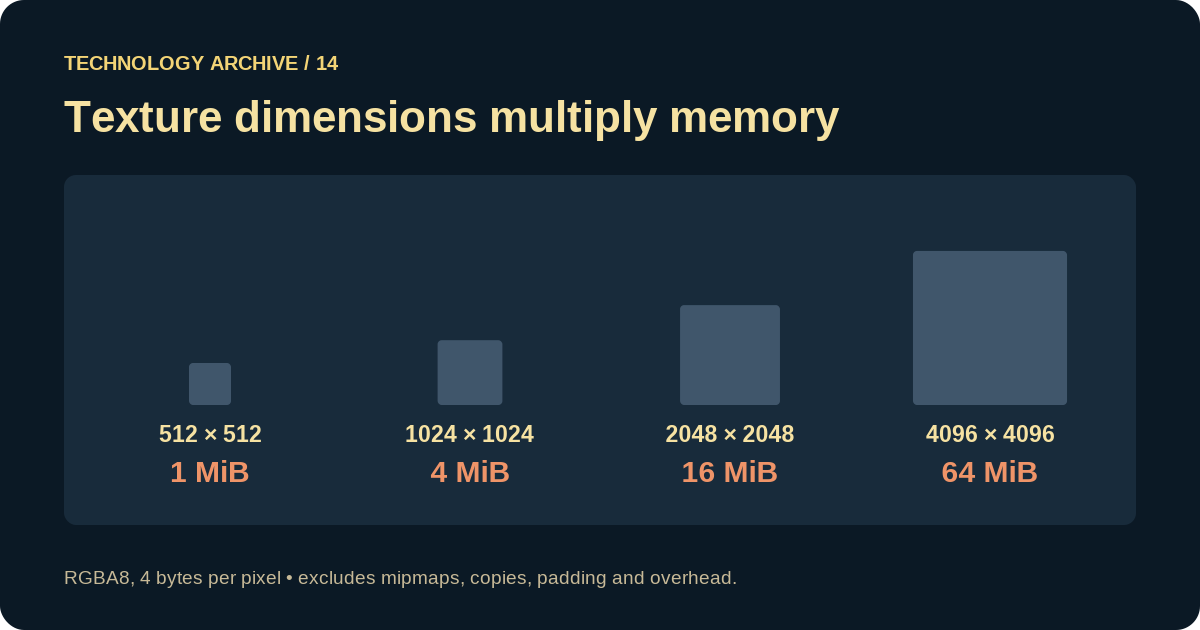
The following theoretical estimates assume a single uncompressed RGBA8 texture, four bytes per pixel, with no mipmaps, padding, copies or other overhead. Actual allocation depends on the format and implementation.
| Texture dimensions | Base allocation |
|---|---|
| 512 × 512 | 1 MiB |
| 1024 × 1024 | 4 MiB |
| 2048 × 2048 | 16 MiB |
| 4096 × 4096 | 64 MiB |
Doubling both dimensions quadruples this base estimate. Multiple live textures, render targets and decoded audio can make the working set substantially larger. An asset budget should therefore track peak concurrent use rather than just the size of the entire download directory. The table is a calculation, not a measurement of a commercial game.
Separate resources needed for a clear initial interface from decorative resources that are not required immediately. Audit font files, audio variants, image dimensions and duplicate assets. Compare alternative image encodings using both file size and visual quality; a format suitable for a background may be unsuitable for small text or transparent icons. Browser and GPU support must be checked on the intended device matrix. [Chrome's modern web performance guidance][8] and [web.dev resource loading guidance][9] provide background for evaluating delivery priorities.
The network waterfall reveals whether a delay is caused by a large download, late discovery of a dependency, or waiting for a response. [Resource Timing][10] distinguishes transfer size and HTTP body sizes. Its decoded body size refers to removal of HTTP content coding, not the number of bytes in a decoded bitmap. Cross-origin measurement can also be restricted, so document missing timing information rather than interpreting every zero as a cache hit.
Caching helps avoid unnecessary transfers but introduces version consistency concerns. [MDN's HTTP caching guide][11] describes long-lived caching for resources whose URLs change when their contents change. Static artwork and application code can use an appropriate versioning policy; current financial information and private account data require different treatment. Verify that a returning browser cannot combine incompatible client code, rules and assets after a deployment. Review these boundaries alongside the slot game certification guide, especially where a change affects reviewed behavior.
Low-End Mobile Browser Testing

Desktop throttling is a useful screening technique, not a substitute for physical devices. Chrome's [guidance on real-world debugging][12] explains the limitations of emulated CPU and network conditions. Real phones introduce different graphics hardware, memory pressure, browser lifecycle policies and thermal constraints. Test representative Android and iOS browsers using their supported inspection tools, with the exact versions documented.
Include both a cold launch and a repeat visit. Test a constrained network, an interrupted connection, an orientation change and a return after backgrounding. Include longer controlled sessions to reveal heat-related slowdowns and cumulative resource retention. Where a web view or embedded frame is part of the supported environment, test that environment separately. Use scripted scenarios with test records rather than live customer wagers.
A useful device matrix includes a low-memory supported handset, a mid-range device and a representative high-resolution screen. Select devices using the intended support policy, not a claim that any particular phone represents all users. Keep test logs and traces free of sensitive account information. Report both successful and failed runs, including crashes or reloads rather than excluding them as outliers.
Performance Audit Checklist
| Test area | Evidence to retain |
|---|---|
| Startup | Cold/warm timing traces and readiness definition |
| Rendering | Frame interval distribution and visual comparison |
| Memory | Equivalent snapshots and allocation estimates |
| Network | Waterfall and interruption test results |
| Mobile lifecycle | Background, resume and orientation checks |
| Accessibility | Legibility and required information checks |
| Integrity | Agreement between displayed and authoritative records |
| Release | Build identifiers, regression results and review decision |
Set acceptance limits in advance for the supported environment. The limits should be realistic, measurable and tied to the purpose of each screen. A performance regression may be acceptable only after explicit review of its consequences; an incorrect balance display or loss of required information is not merely a frame-rate problem. Keep integrity and accessibility checks separate from speed measurements so that an improvement in one metric cannot conceal a failure in another.
Finally, retain before-and-after evidence and explain which change produced the observed difference. Avoid claiming improvements from synthetic examples alone. A stable, correctly presented interface is the goal of the audit, not increasing betting frequency or engagement. For the broader development context, see HTML5 slot game development and the comparison of video game RNG and slot RNG.
Sources and further reading (reviewed 25 November 2026; technical documentation and Great Britain regulatory examples, not universal requirements). No commercial game or physical device was benchmarked for this article.
- https://developer.chrome.com/docs/devtools/performance/overview/
- https://developer.chrome.com/docs/devtools/memory-problems
- https://developer.mozilla.org/en-US/docs/Web/API/WebGL_API/WebGL_best_practices
- https://developer.mozilla.org/en-US/docs/Web/Performance/Guides/Fundamentals
- https://developer.mozilla.org/en-US/docs/Web/API/Page_Visibility_API
- https://www.gamblingcommission.gov.uk/standards/remote-gambling-and-software-technical-standards/rts-14-responsible-product-design
- https://www.gamblingcommission.gov.uk/standards/remote-gambling-and-software-technical-standards/rts-10-interrupted-gambling
- https://developer.chrome.com/docs/modern-web-guidance/guides/performance/performance
- https://web.dev/learn/performance/optimize-resource-loading
- https://developer.mozilla.org/en-US/docs/Web/API/PerformanceResourceTiming
- https://developer.mozilla.org/en-US/docs/Web/HTTP/Guides/Caching
- https://developer.chrome.com/blog/devtools-grounded-real-world