HTML5 Game Engine Architecture
HTML5 game engine architecture describes how a browser game organizes simulation, rendering, input, audio, resources and communication into a reusable client. HTML is only one part of the stack: JavaScript or compiled WebAssembly can implement game logic, while browser APIs provide access to graphics, sound, networking and storage. An engine coordinates these capabilities so that individual levels and gameplay systems do not need to manage every browser detail themselves.
The central design challenge is keeping the game responsive while its environment changes. Display refresh rates differ, assets may arrive late, a tab can become hidden, and a connection can disappear during play. Good architecture makes these conditions explicit rather than assuming an uninterrupted desktop session. Our J2ME versus HTML5 comparison explains how the delivery environment evolved; this guide focuses on the structure of the browser client itself.
Rendering Loop and Scene Management
The game loop coordinates input, simulation and presentation. Browser animation callbacks are scheduled using requestAnimationFrame, which supplies a timestamp and generally follows the display refresh rate. A callback is a one-shot request; the application must schedule subsequent frames. It is not a promise of exactly sixty updates per second. Background tabs may receive fewer or no callbacks. [1][2]
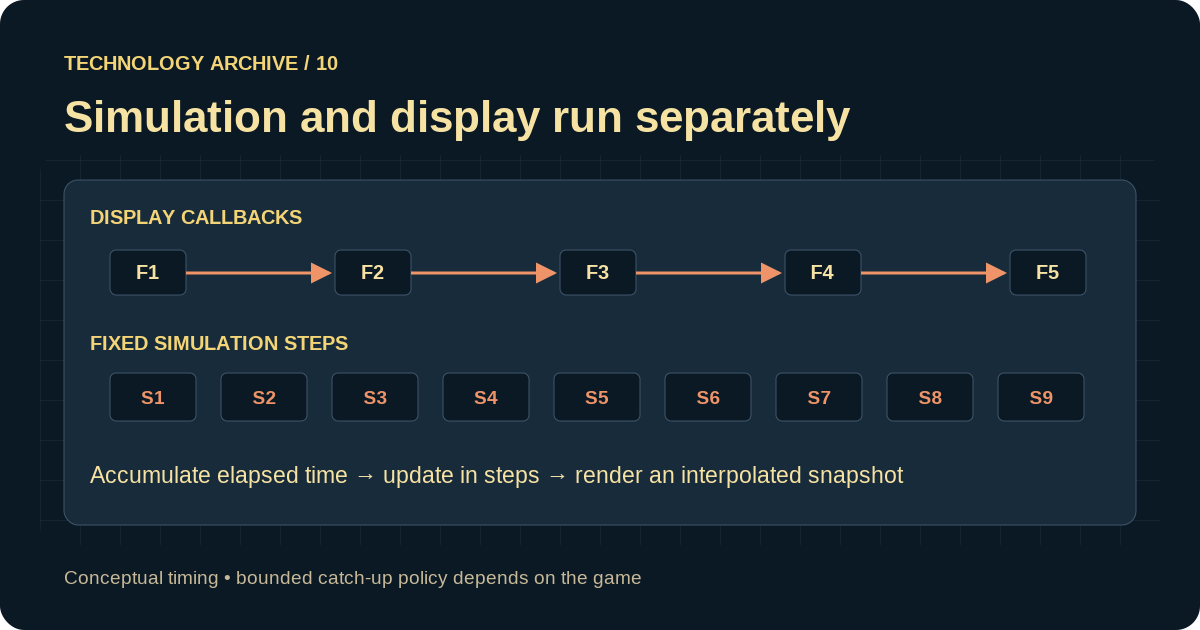
A common approach separates simulation from presentation. A fixed simulation step makes movement, collision and timers easier to reason about, while rendering can interpolate between simulation snapshots. Alternatively, a simple puzzle game may use event-driven logic and animate only when necessary. Neither approach requires every subsystem to run at the same frequency.
| Loop stage | Responsibility | Common failure |
|---|---|---|
| Collect input | Convert device events into game actions | Stuck controls after focus loss |
| Advance simulation | Apply rules, movement and collisions | Frame-rate-dependent movement |
| Publish state | Expose a consistent snapshot to presentation | Partially updated objects |
| Render | Draw the visible scene and interface | Expensive work on every frame |
| Schedule | Request the next frame | Duplicate loops after restart |
A scene manager controls transitions between boot, menu, level and result screens. Each scene can own its entities, listeners and temporary resources, while shared services remain available across transitions. Phaser's documented scene system illustrates this division: scenes can maintain separate display lists and input handling and can run concurrently, for example when a user interface overlays a game world. [3]
Define what happens when a scene starts, pauses, resumes and shuts down. Remove listeners, cancel obsolete requests and release resources when their owner disappears. Otherwise, repeated visits to a menu can silently multiply event callbacks or retain unused objects. Shared textures should not be destroyed while another active scene still references them.
Canvas, WebGL and Animation
Canvas 2D is a useful starting point for sprite games, diagrams and simpler visual experiences. WebGL exposes programmable graphics operations through a canvas context; an engine can organize geometry, textures and shaders around the GPU. WebGPU offers a newer graphics and compute interface, but its availability and device requirements must be checked rather than assumed. [4][5]
| Rendering backend | Typical fit | Engineering consideration |
|---|---|---|
| Canvas 2D | Simple sprites and lightweight 2D scenes | Profile drawing and compositing costs |
| WebGL | Texture-heavy 2D or 3D worlds | Manage GPU resources and context recovery |
| WebGPU | Projects needing modern GPU capabilities | Detect support and define fallback behavior |
Keep world coordinates separate from screen coordinates. A camera maps the world to the viewport, while layout logic positions interface elements. The backing canvas resolution may differ from its CSS size; a high-density display can increase pixel workload substantially. Choose a resolution policy that balances legibility with performance instead of multiplying every dimension without limits.
Animation should consume simulation state rather than change essential rules as a side effect of drawing. A visual transition can be interrupted when a player pauses or navigates away. If progression depends exclusively on an animation completion callback, an interrupted sequence can leave the game in an invalid state. Explicit gameplay transitions prevent that dependency.
Input, Audio and Asset Pipelines
An input layer translates browser events into semantic actions such as move, confirm or pause. Pointer Events provide a common interface for mouse, pen and touch, while keyboard and gamepad handling can feed the same action model. [6] A touch coordinate should be transformed into the game's logical coordinate system before hit testing. On cancellation or focus loss, clear held actions so that a character cannot continue moving indefinitely.
Separate pressed, held and released actions. A menu confirmation usually needs an edge event, whereas movement may depend on a persistent state. Provide keyboard-accessible menus and avoid intercepting browser gestures outside the play area. The experience should still offer usable controls when a gamepad disconnects or a device changes orientation. The handheld porting guide discusses the historical roots of these input and layout decisions.
An audio manager separates music, effects and overall volume. Web Audio can mix decoded buffers through an audio graph, while media elements may suit longer tracks. Browser autoplay rules mean audible playback often needs a user interaction; a start screen should offer a clear way to enable sound. Handle failed playback or a suspended audio context without blocking gameplay. [7][8]
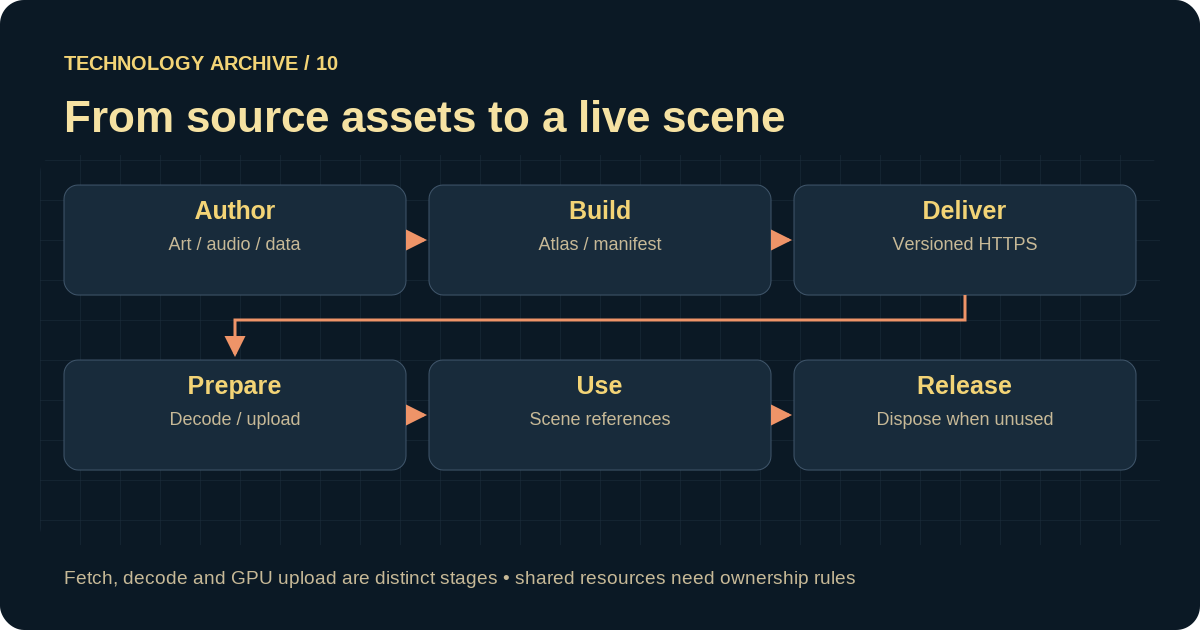
An asset pipeline converts authoring files into deliverable resources, including sprite atlases, sound files, level data and fonts. The loader fetches and decodes these files and, where relevant, uploads textures to the graphics device. A successful download does not necessarily mean a resource is ready to render. Treat fetch, decode and upload as separate stages with separate error handling.
Divide assets into boot-critical resources, shared resources and level-specific bundles. A small boot bundle enables an early loading screen; later bundles can be requested when needed. Phaser documents a similar preloader pattern for shared assets. [9] Record asset identifiers, dependencies and versions in a manifest. Track ownership or reference counts so that unloading one level does not remove artwork used by another.
State, Networking and Persistence
Game state describes what is true in the simulation: positions, scores, inventory, objectives and progress. Presentation state describes what is currently visible, such as camera motion or a fading notification. Separating the two allows a player to resize the window, change graphics settings or rebuild a renderer without changing the underlying game rules.
For a local game, the simulation can own its state. For a multiplayer game, decide which machine has authority over each piece of information. A server-authoritative design validates player actions and sends snapshots or events to clients. The client may predict local movement and reconcile it with later server updates. These are architectural choices, not capabilities automatically supplied by HTML5.
HTTP suits retrieving assets and many request-response operations. WebSocket provides a persistent two-way communication channel suitable for certain interactive games. [10] A networking adapter should isolate protocol messages from scene objects. Validate message structure, cap queued work and specify how the client responds when messages arrive late or a connection closes. Reconnection must restore a consistent state rather than replay every outdated action indiscriminately.
IndexedDB offers asynchronous storage for structured client data. [11] It can hold local progress, preferences or cached metadata, but a browser's storage is not a guaranteed permanent backup. Store a schema version alongside saved data and test migrations. If a write fails, report the failure rather than silently claiming that progress is saved. Server-owned account data should not rely solely on a local copy.
Testing and Deployment Boundaries
Build a test matrix around capabilities and failure conditions, not just browser names. Unit tests can exercise simulation rules without a canvas. Integration tests can check scene transitions, asset errors and network recovery. Real-device testing remains essential for thermal behavior, touch interaction, graphics driver differences and audio policies.
| Test area | Example acceptance condition |
|---|---|
| Timing | Movement remains consistent across supported refresh rates |
| Lifecycle | Repeated scene transitions do not accumulate listeners |
| Assets | Failed downloads produce a retry or readable error |
| Visibility | Returning to a hidden tab does not advance a local game by a huge step |
| Persistence | Old saves migrate or fail with a clear explanation |
| Network | Reconnection restores an agreed state |
The Page Visibility API can inform pause and resume behavior. [12] Online games may continue on a server while the tab is hidden, so pausing the local presentation must not imply pausing the shared world. Use HTTPS for delivery and versioned asset URLs to avoid mixing incompatible releases. Service workers can support offline resource caching, but require deliberate cache update and activation policies. [13] A cached application shell alone cannot make server-dependent gameplay work offline.
Architecture Diagram and Example
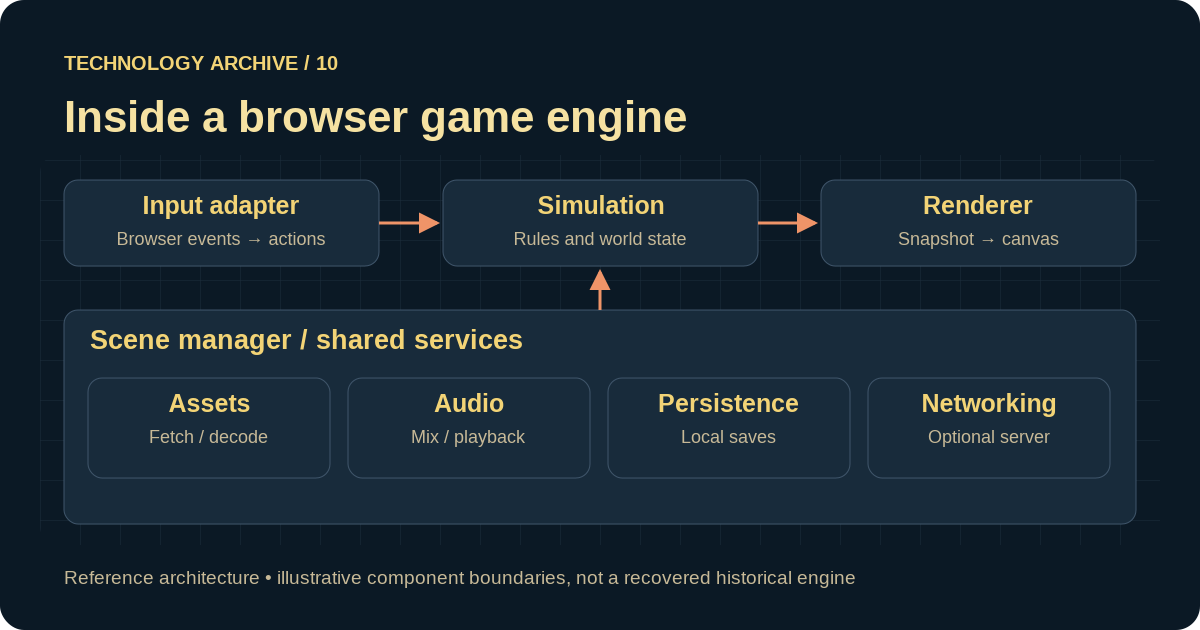
The first illustration in this guide shows a reference client: browser events enter an input adapter; the simulation updates a world model; a renderer draws a snapshot; and the scene manager coordinates shared audio, assets and persistence. Networking is optional and crosses a separate server boundary. This design is illustrative, not the recovered architecture of the historical Whiptail game engine.
The following abbreviated JavaScript loop illustrates a fixed update interval and a bounded catch-up policy for a local game. It assumes that input, world and renderer have already been initialized. It is not a complete runnable engine.
const STEP = 1 / 60;
let previous = null;
let accumulator = 0;
function frame(now) {
  if (previous === null) previous = now;
  accumulator += Math.min((now - previous) / 1000, 0.1);
  previous = now;
  input.collect();
  let steps = 0;
  while (accumulator >= STEP && steps < 5) {
    world.update(STEP, input);
    accumulator -= STEP;
    steps++;
  }
  if (accumulator >= STEP) accumulator %= STEP;
  renderer.draw(world, accumulator / STEP);
  requestAnimationFrame(frame);
}
document.addEventListener('visibilitychange', () => {
  previous = null;
  accumulator = 0;
  input.clear();
});
requestAnimationFrame(frame);
The renderer's interpolation parameter assumes that the world retains previous and current snapshots. A production input adapter must also consume one-shot actions only once, even when several simulation steps occur within one frame. The time clamp and step cap deliberately discard excess elapsed time to prevent unbounded catch-up; this policy is unsuitable for authoritative server clocks and must be chosen according to game requirements.
The value of a reusable engine is not the number of components it contains, but the clarity of their boundaries. Start with a small playable loop, define ownership of state and resources, and add abstractions when repeated needs justify them. That approach preserves the lessons of earlier Barking Lizards game projects without attributing contemporary browser technologies to the historical studio.
Technical references
- MDN — Anatomy of a video game
- MDN — requestAnimationFrame
- Phaser — Scenes
- MDN — Drawing graphics
- MDN — WebGPU API
- MDN — Pointer events
- MDN — Web Audio best practices
- MDN — Autoplay guide
- Phaser — Loader
- MDN — Introduction to game development for the Web
- MDN — IndexedDB API
- MDN — Page Visibility API
- MDN — Using Service Workers